Google Ads Policy Violations: The Suspension Types Advertisers Need To Understand
Policy violations can cause disapprovals, strikes, account holds, or full suspensions. Here is how the system escalates, what counts as egregious, and how to map a label to a fix.
Direct answer: Google Ads policy violations can cause ad disapprovals, limited serving, strikes, account holds, or full account suspensions. Egregious violations may trigger immediate suspension, while other repeated violations can follow a strike-based process. The label you receive names a category, not the exact trigger, so the work is mapping the label to the right audit and fixing the root cause before you appeal.
Understanding how the system escalates is the difference between an overreaction and an under-reaction. A single disapproval is routine. A suspension is not. Google's account suspensions overview is the primary reference for how serious or repeated violations lead to an account being taken offline.
Disapproval, limited serving, strike, suspension
These are four different things, and conflating them causes panic or complacency:
- Ad disapproval. One ad is removed from circulation. The account keeps running. Fix or replace the ad.
- Limited serving. An ad runs in a reduced way because of a restricted-content rule. The account is not suspended.
- Strike. For certain repeated violations, Google applies a warning then escalating strikes, with temporary holds before a suspension.
- Suspension. The whole account goes offline. This needs a full appeal after the root cause is fixed, as set out in our guide on what to do when your Google Ads account is suspended.
Egregious versus repeated violations
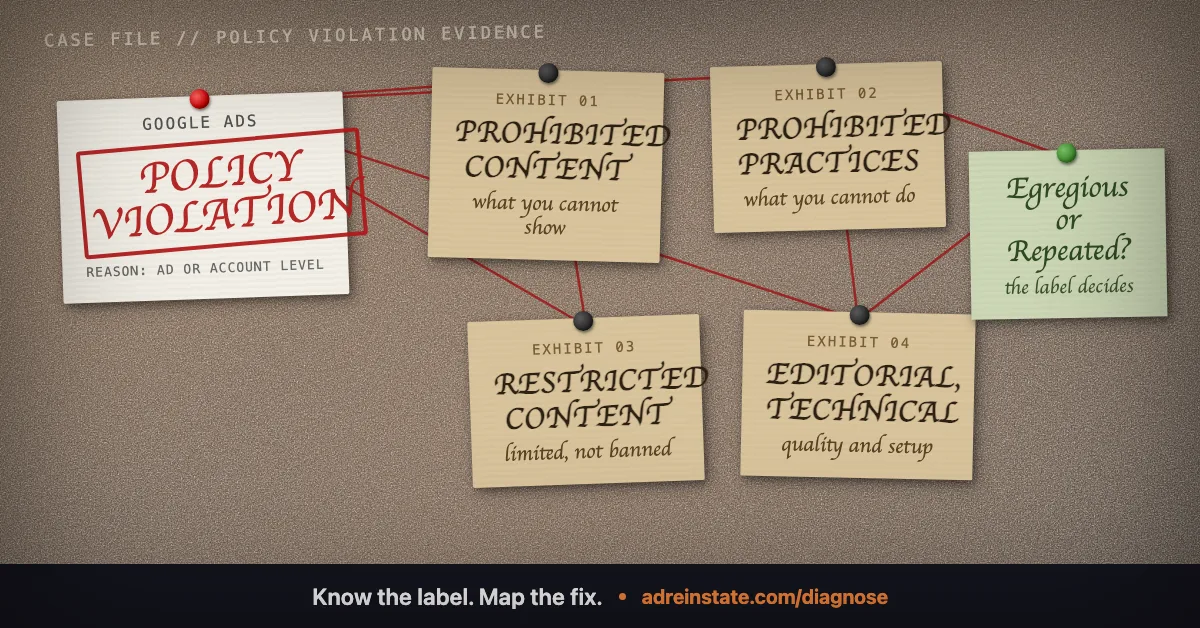
Google treats some violations as egregious, meaning serious enough to suspend an account immediately, with no warning or strike sequence. Others are handled through the strike system, where you get notice and a chance to correct before enforcement escalates. The label in your notice, combined with whether the suspension was immediate, tells you which path you are on and how much room you have.
The policy categories
Google's advertising policies group into four broad areas. Knowing which one your label sits in points you to the right fix:
- Prohibited content. Things you cannot advertise at all, such as counterfeit goods or dangerous products.
- Prohibited practices. How you advertise, including abuse of the ad network, data misuse, and misrepresentation. This is where Circumventing Systems and Unacceptable Business Practices live.
- Restricted content. Things you can advertise with limits, such as alcohol, gambling, or healthcare, often subject to verification.
- Editorial and technical requirements. Quality and functionality standards for ads and landing pages.
Why the label is not the trigger
Google deliberately does not tell you the precise signal that fired. If it did, abusers would patch that one detail and return. So a label like Circumventing Systems can hide a stale CDN cache, a redirect mismatch, or a forgotten old account, and only a broad audit reveals which. This is the single most misunderstood fact about suspensions, and it is why diagnosis comes before any appeal.
Map the label to an audit and a fix
| Policy label | Likely triggers | Evidence needed | Where it maps |
|---|---|---|---|
| Circumventing Systems | Cloaking false positives, redirect or cache mismatch, multiple accounts | Crawler-versus-user screenshots, redirect map, account inventory | Circumventing Systems / PolicyShield Standard |
| Unacceptable Business Practices | False affiliation, unclear model, phishing-style interface | Registration, licences, affiliation proof, model explanation | UBP / PolicyShield Complex |
| Merchant Center Misrepresentation | Feed-to-site mismatch, broken returns or delivery, unclear identity | A coherent, operational store matching the feed | Misrepresentation / MerchantGuard Recovery |
| Suspicious payment activity | Cross-border card, prepaid card, shared or flagged method | Consistent payments profile, settled balance, bank statement | Suspicious payment / FastTrack Billing Recovery |
| Verification failure | Name, entity, address, or document mismatch | Matching identity and business documents | Advertiser verification / VerifyPass |
From label to reinstatement
Once you know the category, the route is the same as any suspension: fix the root cause, then appeal with evidence, using the steps in how to appeal a Google Ads suspension. No one can guarantee Google's decision, so the early effort goes into diagnosis and remediation, not appeal wording.
For short, plain-language answers to the most common questions, read the answers library, or run a free suspension diagnosis to find your label and the right fix.
Frequently asked questions
What counts as a Google Ads policy violation?
A policy violation is any breach of Google's advertising policies, covering prohibited content, prohibited practices, restricted content, and editorial or technical requirements. Depending on severity and history, it can lead to an ad disapproval, limited serving, a strike, or a full account suspension.
What is the difference between a disapproved ad and a suspension?
A disapproved ad is a single ad removed while the rest of the account runs. A suspension takes the whole account offline, usually after an egregious violation or repeated breaches. A suspension needs a full, evidence-based appeal, not just an edit to one ad.
What is an egregious violation in Google Ads?
An egregious violation is a serious breach that can trigger immediate suspension without the warning steps that apply to lesser, repeated violations. Examples include practices Google treats as deceptive or harmful enough to act on at once.
Why does Google give a label but not the exact trigger?
Google withholds the precise trigger on purpose, so bad actors cannot fix one detail and re-enter. The label points to a category, which means the real cause has to be found by auditing every signal Google watches.
How do I map a policy label to a fix?
Treat the label as a category, then audit the matching area: content and claims for content policies, business identity and model for practices, billing for payment flags, and documents for verification. Each label points to a different checklist and a different kind of evidence.
Still narrowing down what triggered your suspension? Read the plain answers to common questions , or see how our reinstatement services map to each violation type.
Not sure which suspension you have?
Start with a free diagnosis. We identify the likely trigger and tell you honestly whether we can fix it, before you spend anything.