Google Ads Account Suspended: What It Means and What To Do Next
A step-by-step guide for suspended Google Ads accounts: identify the policy label, fix the root cause, avoid the common mistakes, and prepare a stronger appeal.
Direct answer: If your Google Ads account is suspended, do not create a new account or fire off repeated appeals. First identify the policy label in the notice. Then audit the account, the website, the billing profile, verification, and any linked accounts to find the real trigger. Fix the root cause. Only then appeal, with evidence that shows what you found and what you changed.
A suspension takes your whole account offline, not just one ad. Google's account suspensions overview explains that suspensions follow serious or repeated policy violations, billing problems, or failed verification. The notice names a category but withholds the precise trigger on purpose, so bad actors cannot fix one detail and slip back in. That design is exactly why diagnosis matters: the label is a starting point, not an answer.
The first 30 minutes: what to do right now
Move deliberately. The instinct to act fast is the instinct that makes most cases worse.
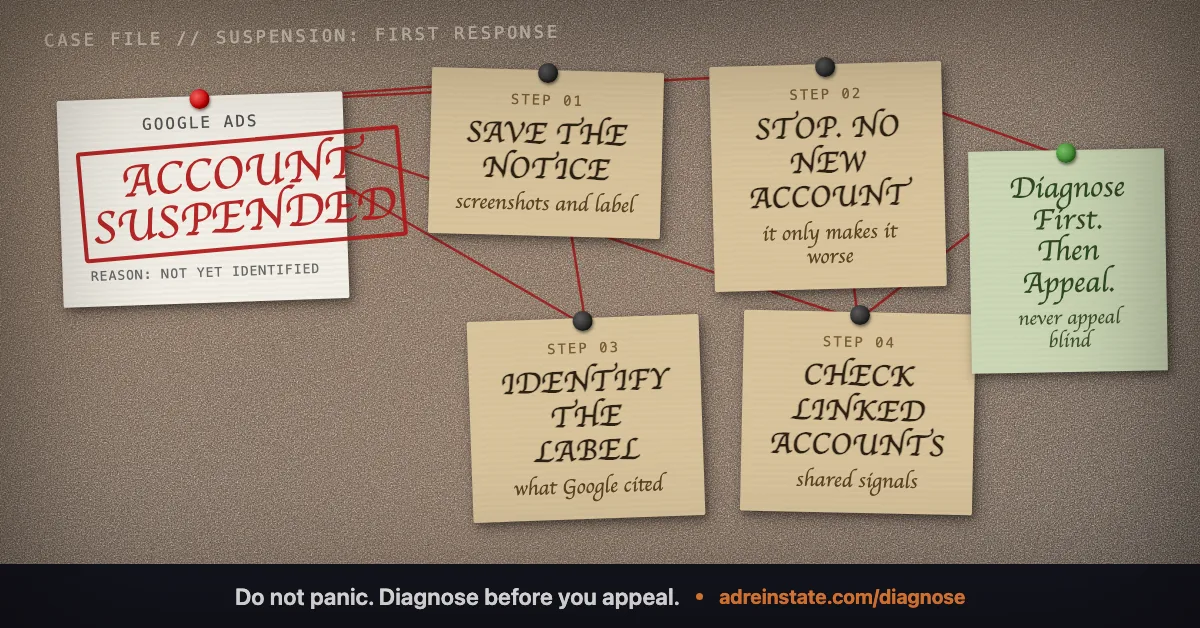
- Save the notice. Screenshot the suspension message and the policy label exactly as written. Record the date.
- Do not create a new account. It is its own violation and the fastest way to deepen the problem.
- Collect your appeal history. Note any previous appeals, their wording, and Google's responses. Repeating a denied appeal rarely helps.
- Check linked accounts. List every Google Ads account, manager (MCC) account, Merchant Center, and Business Profile tied to your domain, payment method, team, or devices.
- Identify the policy label. The label decides everything that follows. Match it to the right path below.
The main suspension categories
Most suspensions fall into a handful of categories. Identify yours, then read the dedicated guide for it before you touch the appeal form.
| Policy label | What it usually means | Where to go next |
|---|---|---|
| Circumventing Systems | Google believes the account tried to bypass ad review, often a cloaking or stale-cache false positive | Circumventing Systems guide |
| Unacceptable Business Practices | Google judges the business model deceptive or harmful, not just one ad | UBP appeal checklist |
| Merchant Center Misrepresentation | The shopping experience or business identity is unclear, inconsistent, or misleading | Misrepresentation checklist |
| Suspicious payment activity | A fraud-risk billing check on the payment method or profile | Suspicious payment fixes |
| Verification failure | Identity or business verification did not pass, usually a document or name mismatch | Advertiser verification guide |
| Malware or compromised site | Google found malicious code on or linked from the site, often without the owner knowing | Malware suspension guide |
Not sure which one applies? That is what a structured diagnosis is for. The broader landscape is mapped in our guide to Google Ads policy violations.
What not to do
These are the moves that turn a recoverable suspension into a hard one:
- Do not spam appeals. Repeated, identical, or emotional appeals reduce your credibility and can exhaust your options.
- Do not open a new account. It triggers Circumventing Systems and links straight back to the suspended one.
- Do not reverse Google's charges. A chargeback on a legitimate charge is treated as a breach of trust and is far harder to undo than a billing suspension.
- Do not change everything blindly. Make targeted fixes and document each one with dates, so your appeal can show exactly what changed.
The evidence-first appeal process
An appeal is not a plea, it is a case. Reviewers compare your live account against the cited policy, so the order of operations is fixed: diagnose first, fix before appeal, then appeal with evidence. In short:
- Classify the suspension from the label and the notice.
- Audit the account, site, billing, verification, and linked accounts to confirm the real trigger.
- Remediate every issue on the live account and site.
- Assemble proof: screenshots, dates, documents, and a clean scan where relevant.
- Write one concise appeal that names the policy, explains what you found, lists the fixes with dates, and requests reinstatement.
The full workflow, with an appeal template, is in how to appeal a Google Ads suspension, and our forensic reinstatement process shows how we run it.
When a case is viable, and when it is not
Honesty serves you better than optimism here. Billing, malware, verification, and many Circumventing Systems cases are genuinely fixable once the trigger is found. UBP and Merchant Center cases are harder but often viable for legitimate businesses. Some cases are not worth appealing at all: a fundamentally non-compliant model, deliberate impersonation, or an account already hardened by repeated denied appeals. A good diagnosis tells you which group you are in before you commit money to an appeal.
How AdReinstate triage works
We start with a forensic diagnosis rather than an appeal. We identify the likely trigger, tell you whether the case is viable, and map it to the right service: PolicyShield Standard, PolicyShield Complex, MerchantGuard, FastTrack Billing Recovery, or VerifyPass, depending on the label. Eligible Google Ads policy, billing, and Merchant Center reinstatement services carry a 100% money-back guarantee if we do not reinstate the account within 60 days, subject to terms. No one can guarantee Google's decision, which is why we decline cases we do not believe are viable instead of charging for an appeal that cannot succeed.
Start with a free suspension diagnosis, read the plain answers to common questions, or see how our reinstatement services map to each violation type.
Frequently asked questions
Why was my Google Ads account suspended?
Google suspends an account when its systems or reviewers detect a policy violation, a billing or payment risk, or a failed verification. The notice gives you a policy label, such as Circumventing Systems or Unacceptable Business Practices, but not the exact trigger. The real cause has to be investigated across your landing pages, billing profile, account history, verification status, and any linked accounts.
Can a suspended Google Ads account be reinstated?
Many can, depending on the violation type and account history. Billing, malware, and verification cases are often highly fixable. Unacceptable Business Practices and repeated denied appeals are harder, and a fundamentally non-compliant business has no viable path. No one can guarantee Google's decision, so the honest first step is diagnosis.
Should I create a new Google Ads account after a suspension?
No. Opening a new account is itself a Circumventing Systems violation and usually makes the original case worse. Google links accounts through domains, payment methods, users, devices, and business details, so the new account is typically detected and suspended too. Fix and appeal the existing account instead.
How many times can I appeal a Google Ads suspension?
There is no fixed number, but each denied appeal makes the next one harder, and submitting the same appeal repeatedly without new information can close the door. The goal is to appeal once, after the root cause is fixed and the evidence is assembled, rather than to appeal often.
How long does reinstatement take?
It varies by violation type and queue, and no honest provider can promise a timeline. Billing cases can resolve in days when handled correctly; UBP and Merchant Center cases take longer. What you control is the quality of the fix and the evidence, which is what shortens the path.
When should I get specialist help?
When you cannot identify the trigger, when an appeal has already been denied, or when the case turns on business-level or technical evidence you are not equipped to assemble. A free diagnosis will tell you the likely cause and whether the case is viable before you spend anything.
Still narrowing down what triggered your suspension? Read the plain answers to common questions , or see how our reinstatement services map to each violation type.
Not sure which suspension you have?
Start with a free diagnosis. We identify the likely trigger and tell you honestly whether we can fix it, before you spend anything.